A Lightroom plugin for annotating folders

Having used Lightroom Classic for many years, I have run into a structural limit of the platform: you cannot attach textual information to a folder. A photo can have a title, a caption, keywords and metadata of every kind, but a folder has just a name. So, where does this need come from? Why would anyone want to attach metadata to a Lightroom folder?
To answer, I first need to explain briefly how I use folders.
Having used Lightroom Classic for many years, I have run into a structural limit of the platform: you cannot attach textual information to a folder. A photo can have a title, a caption, keywords and metadata of every kind, but a folder only has a name. So where does this need come from? Why would anyone want to attach metadata to a Lightroom folder?
To answer, I first need to explain briefly how I use folders.
In Lightroom I manage two types of images: native digital photos and photos digitised from analogue originals. I organise folders differently in the two cases.
- Native digital photos are organised by date: each folder contains the photos taken on a given day with a given camera. For example, the folder 2022-02-06-A7II contains the images taken on 6 February 2022 with the Sony A7II.
- Photos digitised from analogue originals are instead organised by roll. For example, the folder b-0213 contains the photos from roll no. 213, and the prefix b indicates a 35mm black and white roll. Each type of roll (35mm colour, slides, medium format black and white and so on) has its own prefix, and the numbering is progressive for each type.
The problem
With analogue photos the problem appeared immediately: where do I note down the film used, the processing data, the camera? This information concerns the whole roll, and I did not want to duplicate it in the metadata of every image. The most natural place would be the folder that holds the photos from that roll, but a folder has no “notes” field.
As a workaround I used suffixes. That is how the folder b-0270 became b-0270-2016-TRX-HC110-FM2, to indicate a Kodak TRI-X negative, exposed in 2016 in a Nikon FM2 and developed in HC110.
This solution has obvious limits, because a folder name can hold very little information. Where do I record the processing data, such as the dilution and the temperature of the developer? Where do I put notes on how the film was digitised? And where do I note any data about the shooting session and the context, information that applies equally to digital and analogue photos?
Folder Notes
To solve the problem I wrote Folder Notes, a plugin for Lightroom Classic that associates an ordinary text file with a folder. You select a folder, run the plugin’s command and the note opens in the editor of your choice. It is deliberately simple.
Why an external file rather than the catalog? Because Lightroom does not provide a text object. This is also an advantage: the file opens with any editor and can be read independently of Lightroom.
The note files are kept in a folder that you choose in the plugin’s configuration. I decided against keeping them in the photo folder, because Lightroom, thanks to Smart Previews, is designed to work even when the folders containing the photos are not available, and the notes need to stay accessible in that case too.
How the plugin finds the note
The name of the note file is derived from the name of the folder. As we have seen, in my archive the name is made up of a fixed part, which I call the identifier (for example 2022-07-06-A7II), followed by an optional suffix with brief annotations (for example -Bordeaux). The plugin extracts the identifier with a Lua pattern and uses it to name the file: in this case 2022-07-06-A7II.txt.
The advantage is that you can rename the folder by changing the variable part, for example from 2022-07-06-A7II-Bordeaux to 2022-07-06-A7II-Bordeaux-Street, and it stays associated with the same note, because the identifier does not change. Patterns depend on each person’s naming convention, so they are configurable: I use one for digital photos and one for analogue ones. Examples and details are in the README, and anyone unfamiliar with Lua patterns will find a reference at the bottom of the post.
Configuration
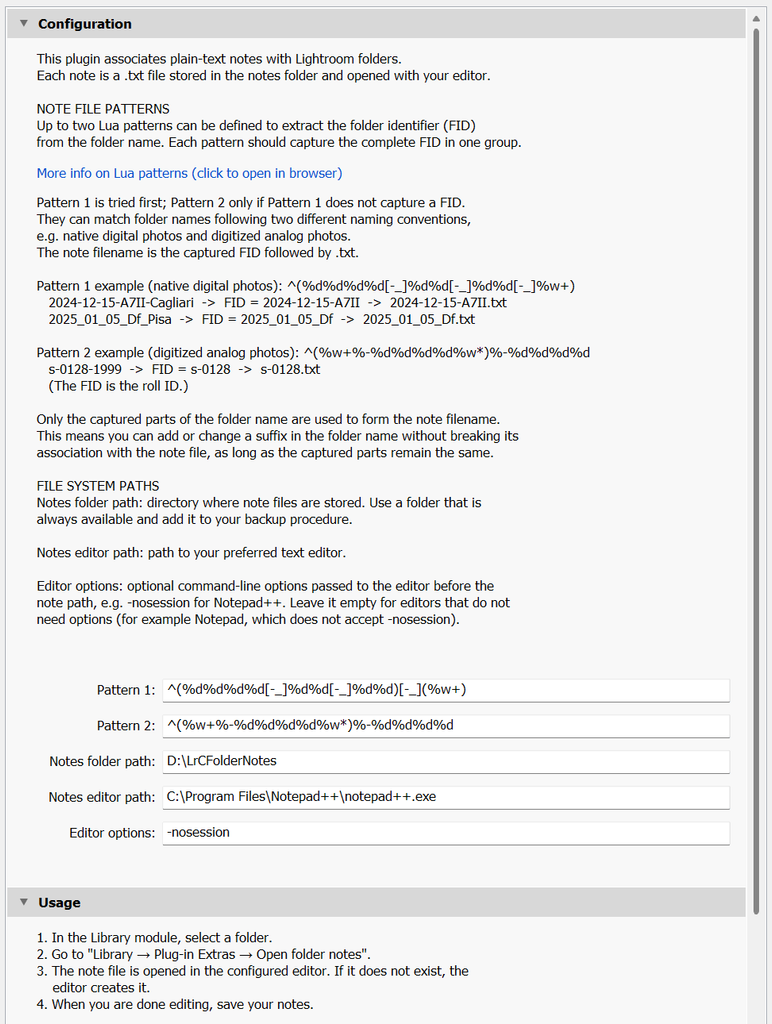
Configuration is done in the Plug-in Manager of Lightroom Classic and needs only a few things: the path of the notes folder, the text editor to use and the patterns, as shown below. For the notes folder, it is best to choose one that is always available and included in your backup.
Compatibility
So far I have only tried it on Windows 11, with Lightroom Classic 14 and later, so I cannot say how it works on macOS.
Download
The plugin is open source (MIT licence) and can be downloaded from GitHub: https://github.com/mrzgll/ma-folder-notes. The README has instructions for installing and configuring it. Bug reports and ideas for new features are welcome.